
How to Add Academic Publications to WordPress Automatically
Keeping a researcher's publication list current by hand is repetitive work, and the page is out of date again as soon as the next paper appears. Scholar Sync imports publications and citation data from OpenAlex: you search for a researcher by name, choose the correct match, and the profile is built for you. No OpenAlex account, author ID, or API key is required.
Why academic publication pages become outdated
The work is rarely difficult. It is just constant, and it never finishes.
Every new paper is a manual edit
A publication list is only current until the next paper is accepted. Each one means finding the reference, formatting it, and editing the page again.
Citation counts drift quietly
Citation totals and h-index figures change continuously. Nothing on the page signals that the numbers went stale, so they are usually wrong long before anyone notices.
One page is fine — forty is not
A department or lab site multiplies the same task by every researcher on it, and the pages drift apart as some get updated and others do not.
The same list is maintained twice
Publications are copied from a CV or an external profile into WordPress, which means the same list is now kept in two places and has to be reconciled.
Updates wait in a queue
When publication pages are hard-coded, a one-line change has to be routed to whoever maintains the site, and small corrections sit waiting.
Formatting drifts over time
Entries added by different people at different times stop matching, and a page that should look authoritative starts looking neglected.
Add a researcher and their publications in 3 clicks
Once Scholar Sync is installed, this is the whole workflow. You type a name; you never look up an identifier.
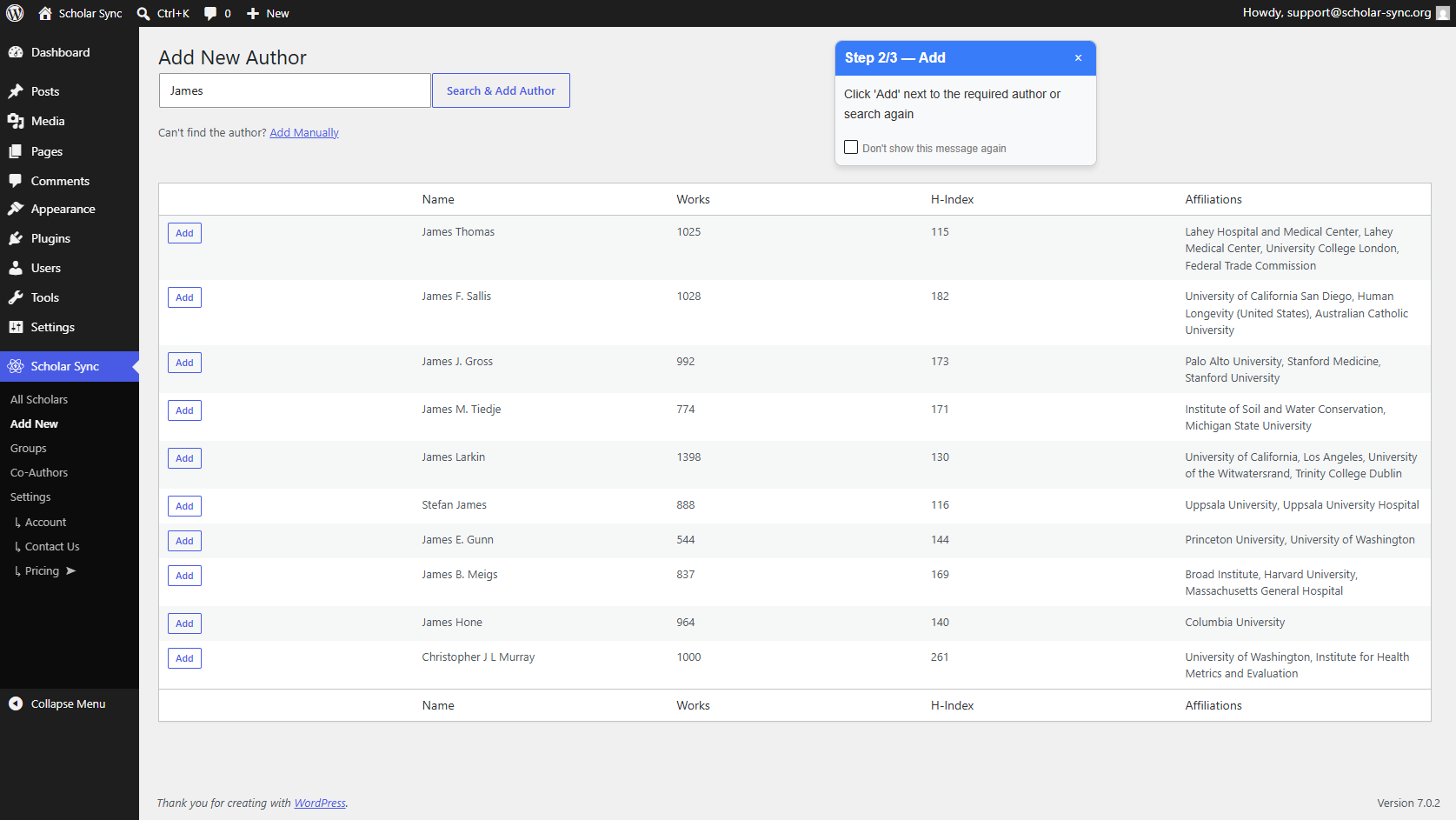
Add New
In the WordPress admin, open Scholar Sync → Add New. That is the only place you need to be.
Search & Add Author
Type the researcher's first and last name and click Search & Add Author. Matching researchers are listed with their works count, h-index, and affiliations so you can tell people with similar names apart.
Add
Click Add beside the correct researcher. Scholar Sync creates the profile and imports their publications and citation data through the Scholar Sync service.
A researcher who cannot be found this way can be added by hand instead, and filled in exactly as you want them. The Adding a Scholar documentation covers both routes.
Publication data from OpenAlex — without API setup
Scholar Sync uses OpenAlex as its scholarly data source: an open catalogue of publications, authors, institutions, and citation data, published under a CC0 licence and covering journals, conference papers, preprints, books, and datasets across every discipline.
Your WordPress site does not talk to OpenAlex. It talks to the Scholar Sync cloud service, and that service handles the OpenAlex integration. The practical consequence is that there is nothing to set up: no OpenAlex account, no author ID to look up, and no API key to paste anywhere. You search by name and choose a person from a list.
Imported automatically, but always under your control
Automation saves the repetitive work. It does not hand editorial control of your site to a database.
Review before you add
Nothing is imported until you pick a researcher from the search results. The works count, h-index, and affiliations shown there are what you use to confirm you have the right person.
Correct any record
A title, venue, year, author list, link, or citation figure can be edited on your own site — on a publication or on the researcher profile.
Add what is missing
Publications that are not in OpenAlex, or not yet indexed, can be added by hand and sit alongside the imported ones.
Remove what does not belong
A publication attributed to the wrong person can be removed. Removal is reversible: the record moves to a Deleted view with a Restore button.
Find duplicates
A Duplicate Titles view collects anything recorded more than once, so near-identical records can be dealt with in one place rather than hunted for.
Corrections survive syncing
Fields you edit by hand are marked as yours. Later syncs refresh everything else and leave your edits as you left them, and a record you removed stays removed.
More detail in Editing a Scholar and Keeping Data in Sync.
Publish one researcher, a lab, or a whole department
Scholar Sync can build the page for you, or give you a shortcode to place wherever you want it.
An individual researcher
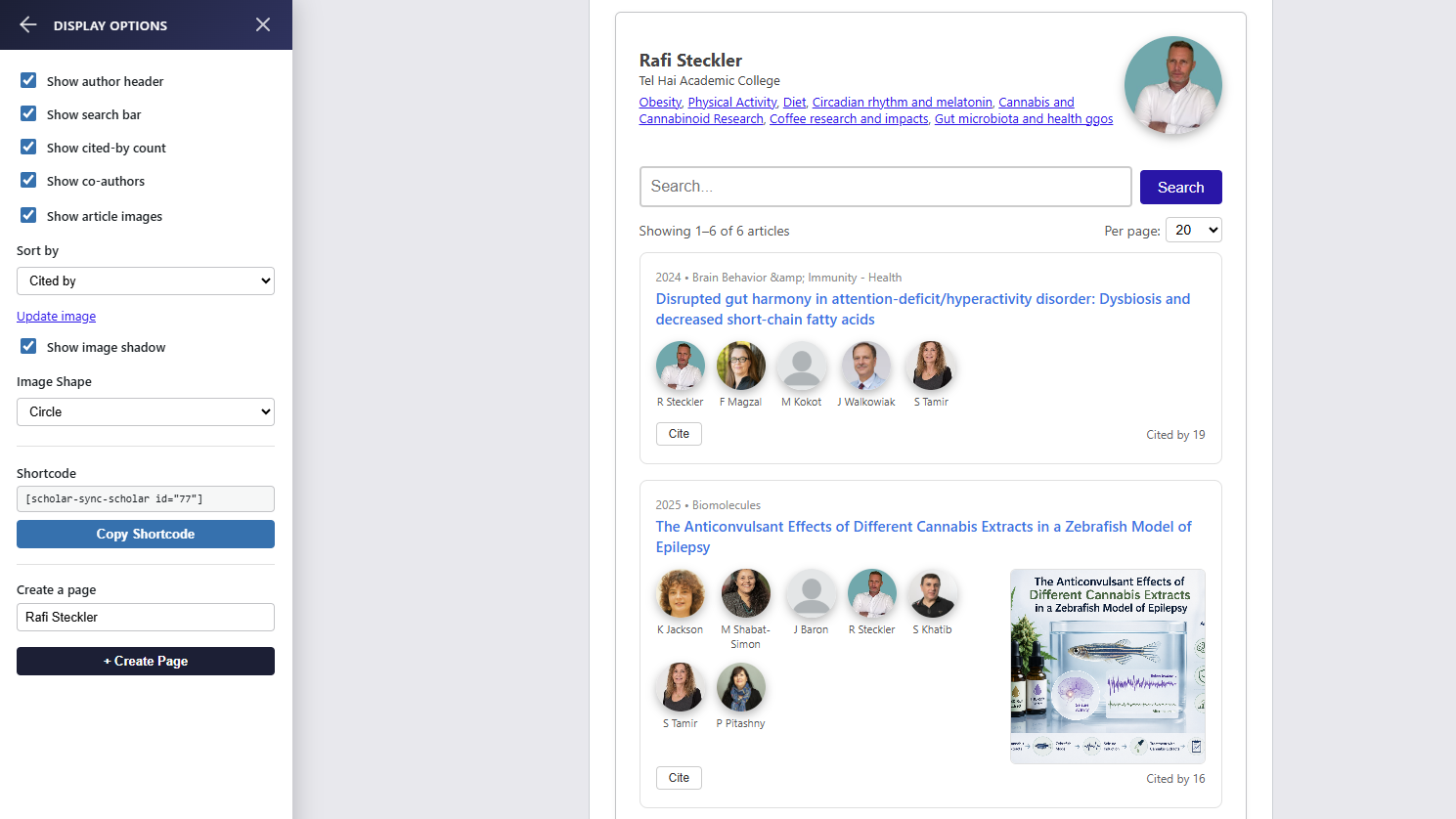
A researcher page shows the profile and the full publication list, with options for co-authors, citation counts, a search box, and publication images. Scholar Sync can create the page for you, or you can place the shortcode yourself:
[scholar-sync-scholar id="77"]
The display options panel copies the shortcode for the researcher you are looking at, including the right ID.
A lab, group, or faculty
A group gathers several researchers together — a lab, a research group, or a whole department — and publishes them as a combined publication feed or a researcher directory:
[scholar-sync-group id="3"]
Groups are assembled in the Scholar Sync admin, so the same researcher can appear on their own page and in their department's listing.
The Shortcodes Reference lists every option, and Groups covers building a lab or faculty listing.
Start free, automate more when you need it
Scholar Sync is free on WordPress.org, and the free plan is a working plan rather than a trial.
Free
- 2 researcher profiles imported from OpenAlex
- Up to 50 imported publications per profile
- Refresh that imported data yourself once every 30 days
- Unlimited researchers and publications created by hand
There is no recurring background syncing on the free plan — you decide when to refresh.
Paid plans
- Scheduled automatic syncing, so profiles refresh on their own
- Higher service limits — more profiles and more publications per profile
Sensible once you are maintaining more than a couple of researchers, or you would rather not remember to refresh at all. See the plans and prices.
Built for modern academic websites
Publication content is rendered directly into the page HTML rather than assembled only after JavaScript runs, and researcher and publication pages carry schema.org structured data — Person for researchers, ScholarlyArticle for publications.
That combination makes a publication page straightforward for search engines and AI systems to read and interpret, and it means a crawler that does not execute JavaScript still sees the real content instead of an empty container.
See Scholar Sync in action
A short walkthrough of the workflow described above.
Common questions
Do I need an OpenAlex account or API key?
No. Your WordPress site talks to the Scholar Sync cloud service, and that service handles the OpenAlex integration. You search for a researcher by name and choose the correct match — there is no OpenAlex account to create, no author ID to look up, and no API key to paste.
Can I use it without paying?
Yes. The free plan covers 2 researcher profiles imported from OpenAlex with up to 50 imported publications each, and you can refresh that imported data yourself once every 30 days. Researchers and publications you create by hand are unlimited. Paid plans add scheduled automatic syncing and higher limits.
What if the imported data is wrong or incomplete?
You can correct it on your own site. Titles, venues, years, author lists, links, and citation figures can all be edited, missing publications can be added by hand, and incorrect ones can be removed and restored later if needed. Fields you edit are marked as yours, so later syncs refresh everything else and leave your corrections alone.
Does it work with my theme?
Scholar Sync is a standard WordPress plugin that outputs regular HTML and CSS through shortcodes and Gutenberg blocks, so it works with any theme and can be restyled with CSS.
Can I show a whole lab or department, not just one researcher?
Yes. A group gathers several researchers into a combined publication feed or a researcher directory using the [scholar-sync-group] shortcode, and the same researcher can appear both on their own page and in their department listing.