
A full researcher profile,
in 3 clicks.
Scholar Sync is a WordPress plugin that builds a polished publications page from OpenAlex data. Search for a researcher by name, choose the correct match, and the profile and publication list are built in 3 clicks — no coding, and no OpenAlex account, author ID, or API key required. Built for researchers, labs, and faculties.
Everything you need, nothing you don't
Scholar Sync handles the hard part so you can focus on your research.
Publications From OpenAlex
Search for a researcher by name and Scholar Sync imports their publication list from OpenAlex. Free plans refresh on demand every 30 days; paid plans re-sync automatically on a schedule.
Individual Author Profiles
Each researcher gets a profile page with publications, affiliations, research interests, and citation metrics imported from OpenAlex. Photos and job titles are added in WordPress — and any interests or citation figures you edit by hand are kept on the next sync.
Lab & Group Pages
Aggregate publications from multiple researchers into a shared lab or research group page with a single [scholar-sync-group] shortcode.
Faculty Directory
Display all faculty members in a searchable, filterable directory. Perfect for department websites.
WordPress Native
Built as a standard WordPress plugin using shortcodes and Gutenberg blocks. Works with any theme, no page-builder lock-in.
Search- & AI-Friendly Output
The first page of every researcher and publication list is rendered into the initial page HTML and marked up with schema.org Person and ScholarlyArticle metadata — so search engines and AI systems that don't run JavaScript still see the real content.
Powered by OpenAlex
Built on OpenAlex — and yours to correct
OpenAlex is a professional, reliable, and thoughtfully designed open data platform for scholarly information. Virtually every published researcher is already indexed, with rich metadata across every discipline, under a CC0 licence. Your WordPress site talks to the Scholar Sync cloud service, and the Scholar Sync service handles the OpenAlex integration for you — no OpenAlex account, author ID, or API key is required from you.
Like any index built automatically at that scale, an individual record is not always perfect: a paper recorded twice, an author string that came through mangled, a citation count or a venue you would write differently, a preprint that never made it in. Scholar Sync does not ask you to live with that. Any imported publication can be corrected, added, or removed on your own site, and any profile field can be overridden — your changes are protected, so the next sync refreshes everything else and leaves them exactly as you left them.
Authors, affiliations, DOIs, citations, abstracts, open-access status — all in one place.
CC0 licensed data — free to use, no paywalls, no restrictions for academic or commercial use.
Virtually every published researcher — journals, conference papers, preprints, books, and datasets, in every discipline.
When a record needs a fix
Fix a title, venue, author list, year, link, or citation count — on a publication or on the researcher profile. Scholar Sync marks what you changed, and later syncs leave it alone.
A Duplicate Titles view surfaces anything recorded more than once. Removing a record is reversible — it moves to a Deleted view with a Restore button, and it stays gone on the next sync.
Add a publication by hand to any profile, or build a researcher entirely yourself. Manually created researchers and publications are unlimited on every plan.
Built for every level of academic institution
Individual Researchers
You've built a body of work. Scholar Sync makes it easy to display it on your personal or institutional WordPress site — refresh it yourself whenever you like, or let a paid plan re-sync it on a schedule.
Perfect for: PhD researchers, postdocs, independent academics
Research Labs
Bring your entire lab's output together in one place. Show funders, students, and collaborators what your team has published — kept up to date by scheduled syncing on paid plans.
Perfect for: PI-led research groups, interdisciplinary labs
Departments & Faculties
Give every faculty member a polished profile and build a department directory that refreshes on your plan's sync schedule. Impress visiting academics and prospective students.
Perfect for: Department heads, faculty web admins, university IT teams
Install once, then a profile in 3 clicks
No coding required. No OpenAlex account, author ID, or API key.
Install the Plugin
Download Scholar Sync free from WordPress.org and activate it on your WordPress site like any other plugin.
Search by Name
Type the researcher's name and hit Search. Scholar Sync queries OpenAlex through its own cloud service, so you never handle an OpenAlex account or API key.
Choose the Correct Researcher
Matching candidates appear with their affiliations, publication counts, and h-index. Click Add next to the right person and Scholar Sync builds the profile page and imports the publications — no shortcodes to place manually.
Keep It Up to Date
On the Free plan you can refresh a synced profile yourself every 30 days. Paid plans re-sync publications in the background on your plan's schedule.
New to this? Read the full guide on how to add academic publications to WordPress automatically.
See it in action
A clean, professional look out of the box.
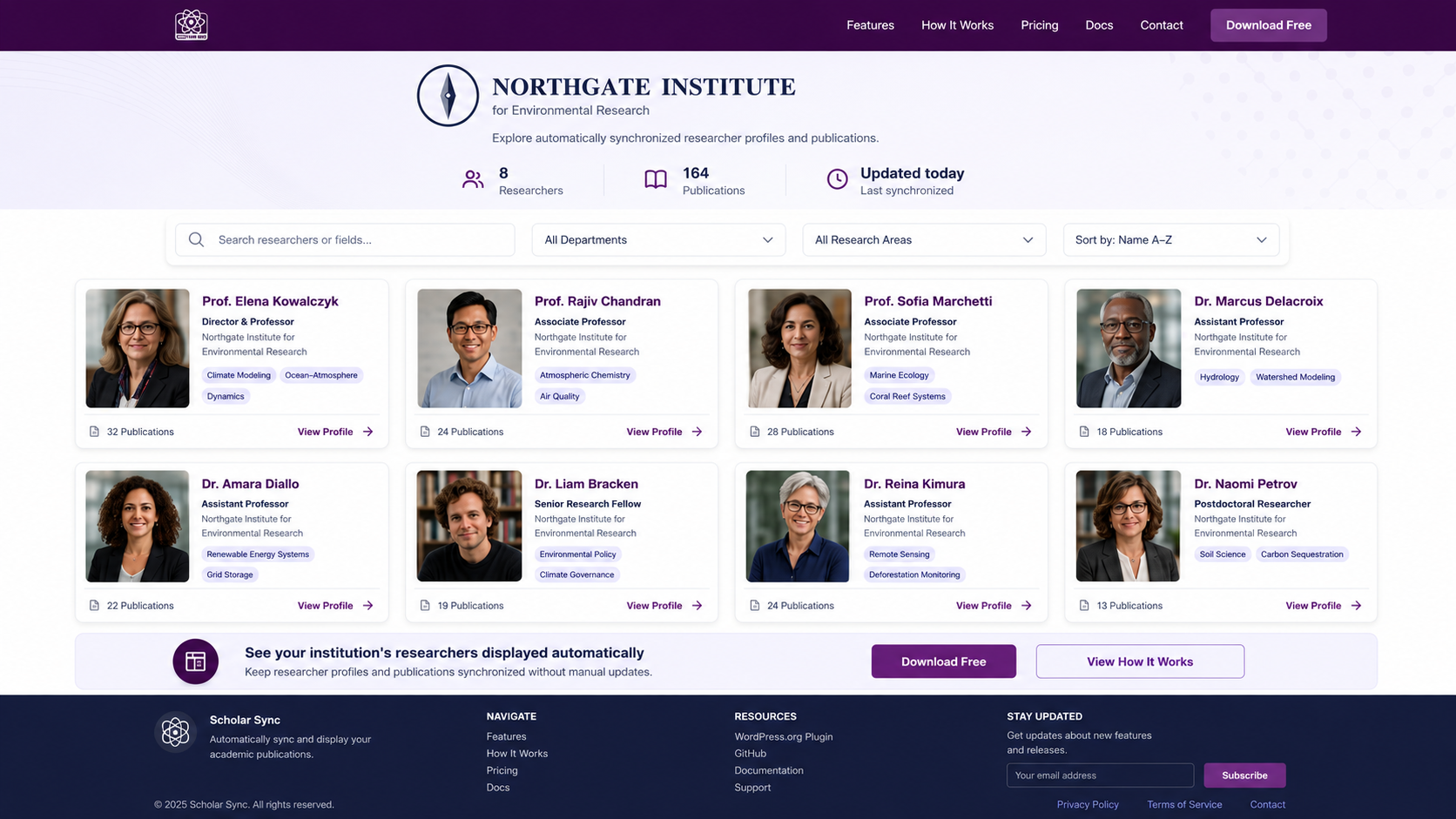
Researcher Directory — a grid of profiles, publication counts, and tags, refreshed on your plan's sync schedule.
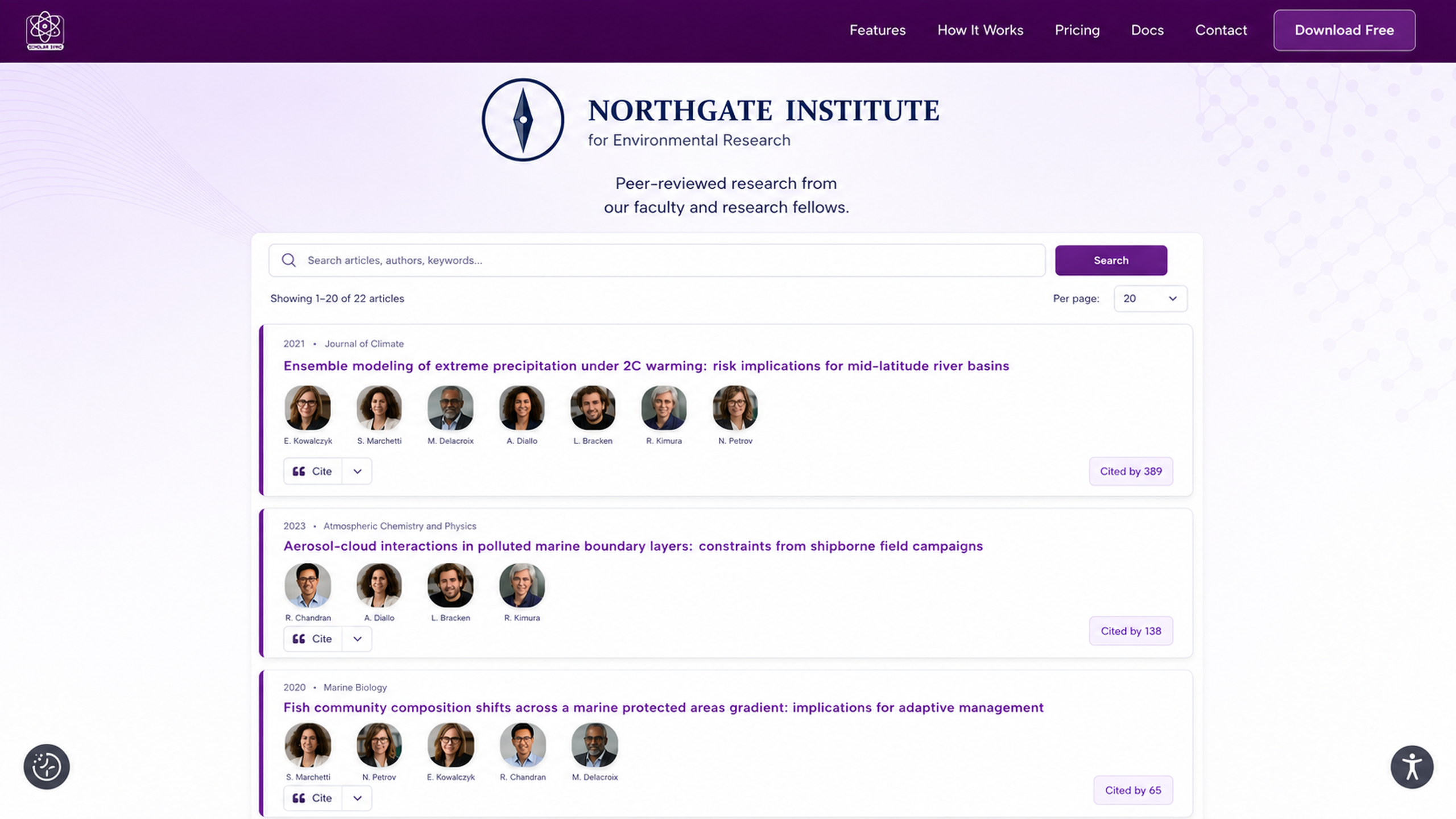
Publications Feed — every publication listed with co-authors, citation counts, and one-click citations.
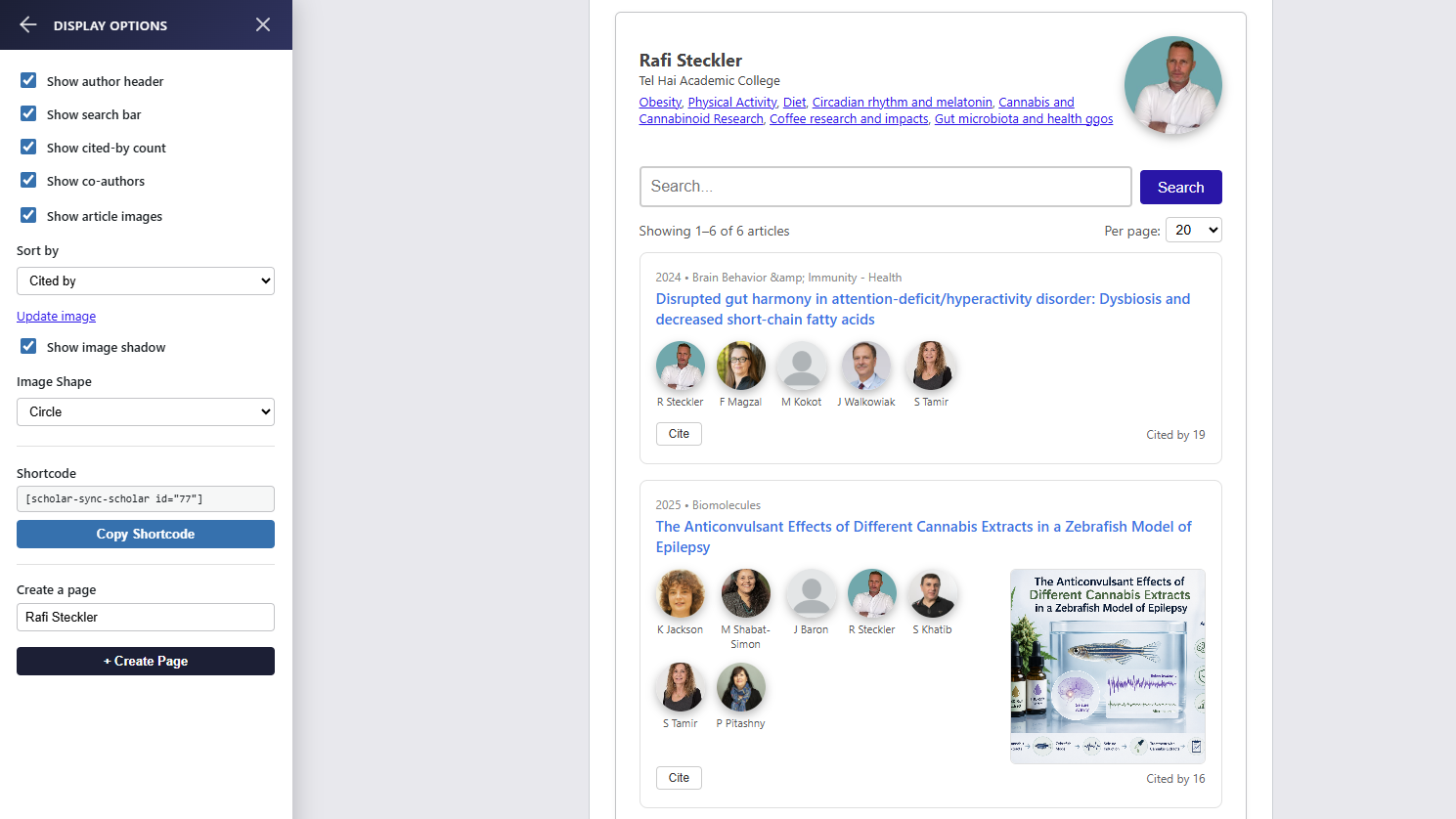
Live Preview & Customization — tweak display options for any researcher and get an instant, ready-to-use shortcode.
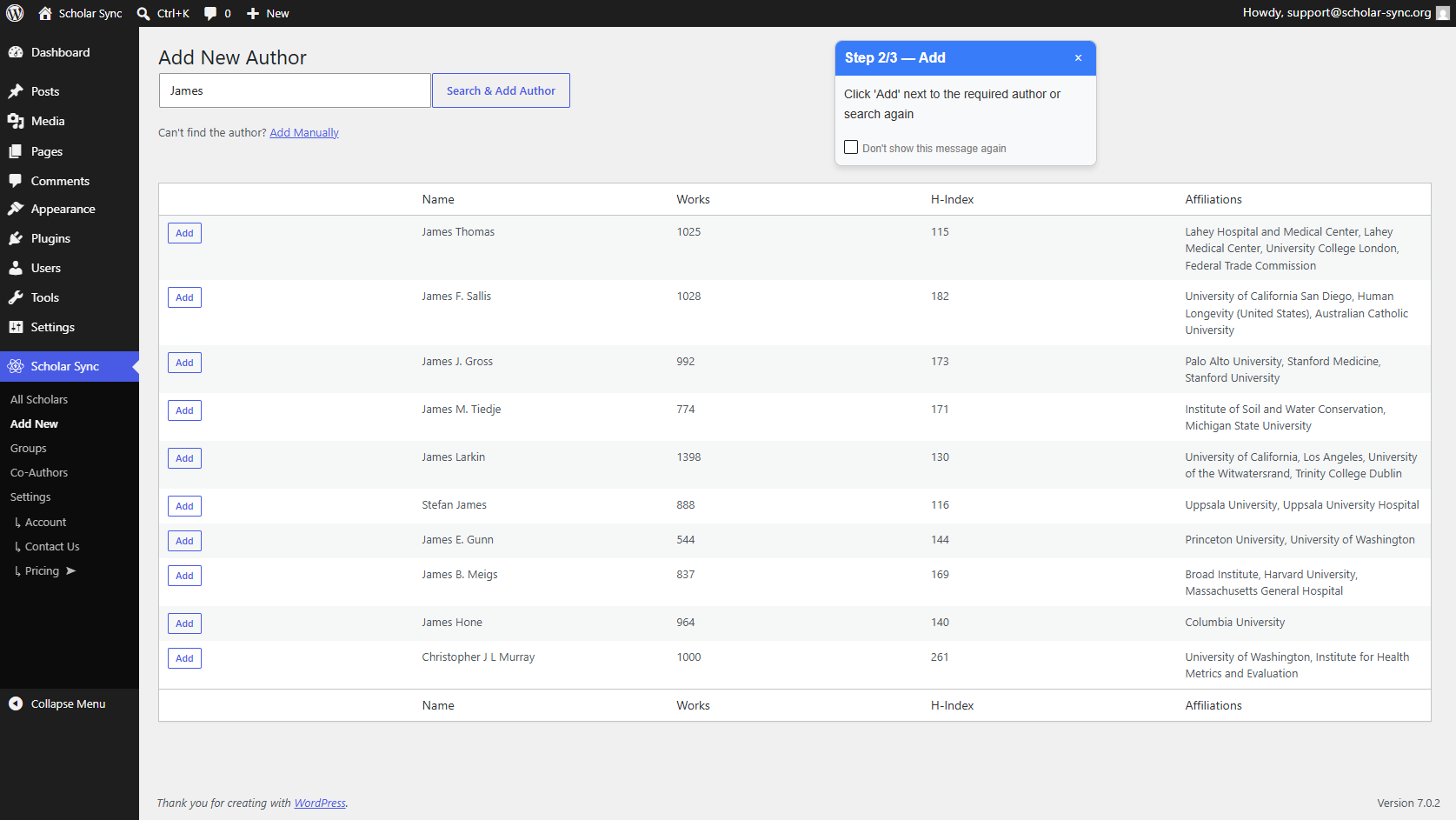
Add New Scholar — search by name and import the matching researcher with publications already attached.
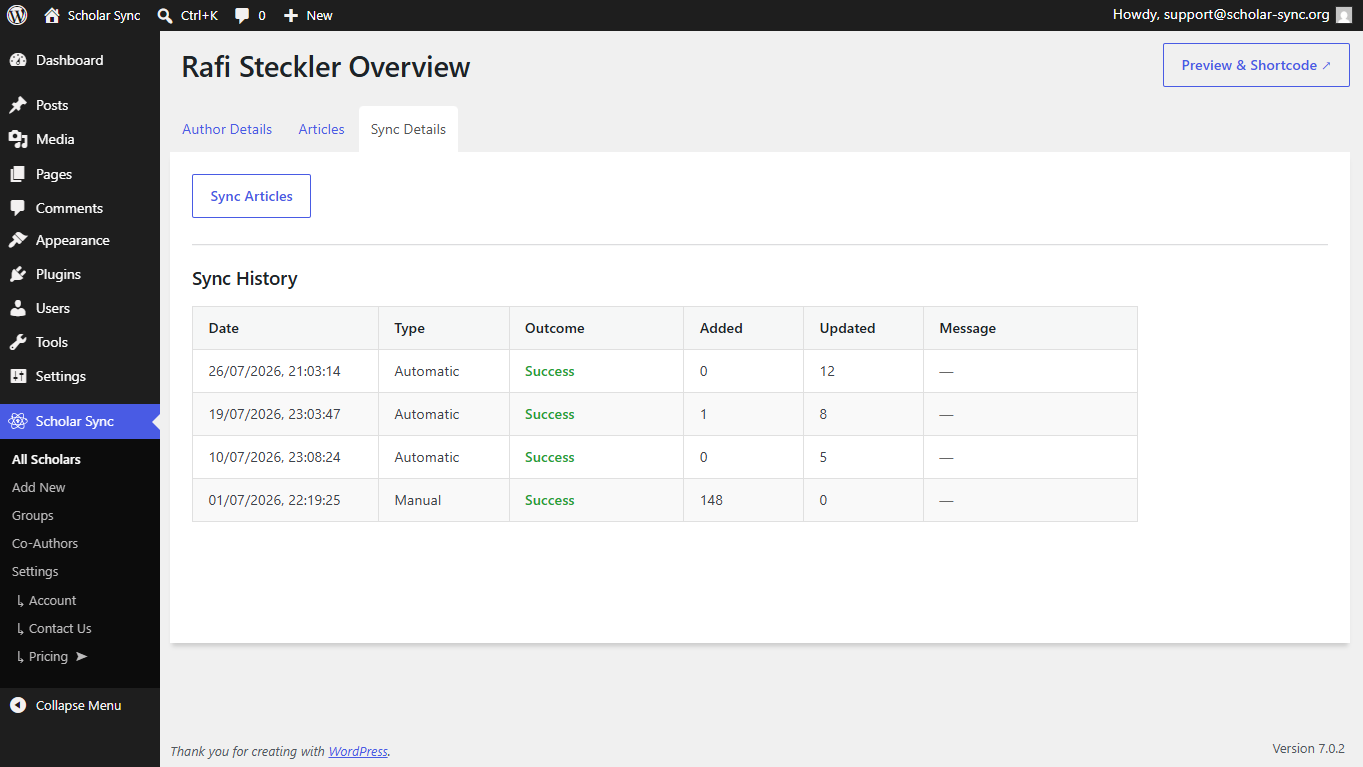
Sync History — a transparent log of every scheduled and user-triggered sync, so you can see exactly what changed and when.
Start free. Scale when you're ready.
Scholar Sync is fully functional at no cost. Upgrade for scheduled automatic syncing and more profiles.
- 2 synced researcher profiles
- Up to 50 imported publications per profile
- Refresh synced data yourself every 30 days
- Unlimited manually created researchers & publications
- Community support
- 2 synced researcher profiles
- Up to 800 publications per profile
- Auto-sync every 14 days
- Email support
- 6 synced researcher profiles
- Up to 800 publications per profile
- Auto-sync every 7 days
- Email support
- All Scholar Pro features
- 50 synced researcher profiles
- Up to 1,000 publications per profile
- Auto-sync every 3 days
- Priority email support
- All Lab Pro features
Need more than 50 profiles or a custom sync schedule? Contact us → — we handle special institutional requests.
All plans are single-site licenses. Prices in USD. Annual billing saves up to 17%.
Frequently asked questions
Is Scholar Sync really free?
Yes. The Free plan is fully functional with no time limit. You get 2 synced researcher profiles with up to 50 imported publications each, and you can refresh that synced data yourself once every 30 days. Researchers and publications you create by hand are unlimited. Upgrading to a paid plan adds scheduled automatic syncing, more profiles, and more publications.
What publication sources does Scholar Sync support?
Scholar Sync uses OpenAlex — a large, open-access scholarly data platform — as its data source. Your site talks to the Scholar Sync cloud service, which handles the OpenAlex integration: you search for a researcher by name and pick the right match, with no OpenAlex account, author ID, or API key needed.
Do I need coding skills to use Scholar Sync?
No. Search by researcher name, choose the right match, and Scholar Sync builds the profile and publication list in 3 clicks — all from the WordPress admin panel, with shortcodes and standard Gutenberg blocks for placing content. No PHP or JavaScript knowledge required.
What happens if I cancel my paid plan?
Your site continues to display your existing publications. Scheduled automatic syncing stops, and your plan limits revert to the Free tier (2 synced profiles, 50 imported publications each, with a user-triggered refresh every 30 days).
Is my data stored on your servers?
Publication metadata is fetched via the Scholar Sync cloud service and stored in your own WordPress database. You own and control your data on your site.
Can I use Scholar Sync on multiple WordPress sites?
Each plan license covers a single WordPress site. Contact us for multi-site or institutional licensing.
Does Scholar Sync work with any WordPress theme?
Yes. Scholar Sync outputs standard HTML/CSS that works with any theme. Styling can be customized via CSS.
How do I display a group of researchers together?
Use the [scholar-sync-group] shortcode or the Group block to aggregate multiple profiles into one page. Groups are configured in the Scholar Sync admin panel.